Data Model part 2 - DTO {Data Transfer Object}

Data Model part 2 - DTO {Data Transfer Object}
- Simplicity
- data flows from one part to another
- data flows from one Layer to another
- Security {data sensitivity}
- column restriction
- Masking
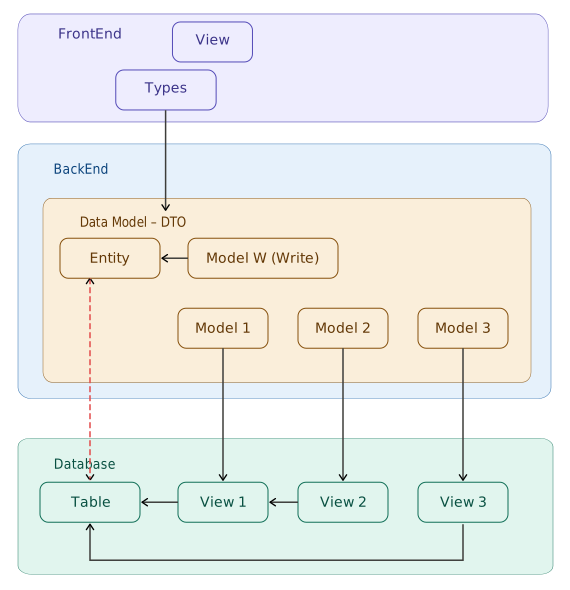
- Entity maps to the actual
Table - DTO maps to
Database Object{Table, Views} - Types {on the FrontEnd} map to DTO {on the BackEnd}
- HTML View {on the FrontEnd} maps HTML components to an Object {which is an instance of Types}
Implementation Example:
- Table: Sales Order
- Header with more than 80 columns
- Items with more than 50 columns
- Not everything will be used on the FrontEnd {HTML View} with a one to one mapping
- there are mechanisms for:
- column restriction
- Masking
Model has 2 groups:
- Simple Model
- More complex Model
Types:
x. Database Entity
- blank: no suffix
- W: Write-able
- R: Read {W + something Read-able}
- X: Combination {Read + Details}
- WD: Data {W + Data JSON string}
- RD: Data {R + Data JSON string}
- _Details: for Header Details
- _Selection: for data selection on Page: List / Form
- _light: a compact version of the blank type
- _Item_count: aggregate item count
x. Database Entity
represents the actual Table in the Database
1. blank: no suffix
- used to display Data
- on Page: List
- not on Page: Form
- Situation:
- Simple Model:
- inherits from Type W
- More complex Model:
- since this blank Type is for displaying Data, some fields from Type W need to be hidden
- a new Class is created
- does not inherit from Type W
- Simple Model:
[Framework_Model("XSomethingRequest")]
public class XSomethingRequest
{
    public string Code { get; set; }
    public string StatusX { get; set; }
    // ...
    public double TotalQuantity { get; set; }
    public double TotalOpenQuantity { get; set; }
    // fields specific to List page needs
}
2. W: Write-able
- used to Write data to an Entity in the Database
- kept separate from the Entity, because some Entity fields need to be hidden
- “Aliasing” is often needed, so the following keywords are used:
[Computed]
[JsonIgnore]
- Aliasing example:
[Computed]
[JsonIgnore]
public virtual string VendorID
{
    get { return Vendor; }
}

public string Vendor { get; set; }
Note: this pattern is used to map field names between the Entity and an external system, without exposing both names to the FrontEnd at the same time.
3. R: Read {W + something Read-able}
- used to Read data on Page: Form
- inherits from Type W
- additional columns/fields are added for supplementary information
- using the suffix
Xpattern on fieldName, for label / display name
- using the suffix
[Framework_Model("XSomethingRequestR")]
public class XSomethingRequestR : XSomethingRequestW
{
    public DateTime InsertStamp { get; set; }
    public string InsertedBy { get; set; }
    public string VendorX { get; set; }        // display name for Vendor
    public string StatusX { get; set; }        // display name for Status
    // ...
}
4. X: Combination {Read + Details}
- this Type is needed for Models that follow a Header - Detail structure
- there is a “Header” part →
dataInput - there is a “Details” part →
details
public class XSomethingRequestX
{
    // note:
    //    - for consistency with the FrontEnd
    //    - use lowercase dataInput, not DataInput
    //    - same applies to details
    public XSomethingRequestWD dataInput { get; set; }
    public XSomethingRequest_Details details { get; set; }
}
5. WD: Data {W + Data JSON string}
- this Type is needed to handle a Data column {JSON String}
- inherits from Type W
- will eventually hold fairly large data/content
- created as a separate class:
- at some point, this Data column {JSON String} could be moved to a different Database {for Performance reasons}
- making this Class easy to modify
public class XSomethingRequestWD : XSomethingRequestW
{
    public string Data { get; set; }
}
6. RD: Data {R + Data JSON string}
- same as WD, but inherits from Type R
- used when a Form needs to display the complete data including the JSON string
[Framework_Model("XSomethingRequestR")]
public class XSomethingRequestRD : XSomethingRequestR
{
    public string Data { get; set; }
}
Note:
[Framework_Model]on RD uses the same name as R — because RD is a superset of R.
7. _Details: for Header Details
- Class for Details
- contains 1 or more Arrays
- example:
public class XSomethingRequest_Details
{
    public XSomethingRequestItemW[] Items { get; set; }
}
// more complex example:
public class XSomethingElse_Details
{
    public XSomethingRequestItemW[] Items { get; set; }
    public XExpense[] Expenses { get; set; }
    // ...
}
8. _Selection: for data selection
- used to display data in a selection / lookup context
- typically a modal / dialog for selecting data
- can also be an expandable row on Page: List
- not for Write
- naming convention:
{Entity}_Selectionor{Entity}_{DetailName}_Selection - example:
[Framework_Model("XSomethingRequestItem_Selection")]
public class XSomethingRequestItem_Selection
{
    public string RequestCode { get; set; }
    public string ItemCode { get; set; }
    public string Description { get; set; }
    // ... fields relevant for the selection display
    public double TotalOpenQuantity { get; set; }
}
9. _light: compact version of blank
- inherits from the blank type, without adding any fields
- used when a different Class name is needed for
[Framework_Model]- for example: for a different endpoint or context
- example:
[Framework_Model("XSomethingRequest_light")]
public class XSomethingRequest_light : XSomethingRequest { }
Note: Even though the Class is empty, a different
[Framework_Model]allows the Framework to handle the mapping separately.
10. _Item_count: aggregate item count
- a simple Class to display the number of items per record
- typically used for UI purposes: badge / counter on Page: List
- example:
[Framework_Model("XSomethingRequest_Item_count")]
public class XSomethingRequest_Item_count
{
    public string Code { get; set; }
    public int Count { get; set; }
}
Notes:
- in coding, for readability — Type W Model is usually written first, before the blank Type
- simple
CoC: Convention over Configuration:- suffix
Xon the field name (not the Class name) = display name / label for that field
examples:StatusXforStatusVendorXforVendor
- benefit: makes things easier on the FrontEnd
- suffix
why do I use the suffix X?
- X = short for eXtended / eXtra
StatusX→ extended info fromStatusVendorX→ extra info fromVendor
- practical:
- short — only 1 character
- no conflict with common field names
suffix
X= display name / label for that field
alternatives considered — and why they were not chosen:
- suffix
Label→ too long:StatusLabel - suffix
Name→ ambiguous:StatusNamecould be misread - suffix
Display→ verbose:StatusDisplay
Xwins because: short, consistent, and its meaning is clear once you’re used to it
keywords:
[Table]→ maps to the Table name in the Database- example:
[Table("Table_Name")]
- example:
[Framework_Model]→ maps to the Model name in the Framework- example:
[Framework_Model("XPROD_ViewName")]
- example:
[ExplicitKey]→ Primary Key that is not auto-generated[Computed]and[JsonIgnore]→ fields not sent to the FrontEnd, used for Aliasing