E2E {end-to-end} Testing: 4 tipe Testing Script

E2E {end-to-end} Testing: 4 Types of Testing Script
From my experience using Playwright for E2E {end-to-end} Testing, I categorize Testing Scripts into several Types:
Type 1: simple Form
- even if the Form involves more than 50 fields
- and is designed UI/UX-wise with several separate
TABs - as long as there is no
List of Items/Details, it still belongs to this Type
Type 2: Header - Detail
- not related to UI/UX with separate
TABs - the pattern is:
- there is a section acting as the Header
- there is a
List of Items/Detailssection
Type 2x: Header - Detail - X
- within a Row in the
List of Items/Details - there is a field/column in the form of
Autocomplete - which, when filled, will “effect” other fields/columns
- example:
- an Inventory Item field that is
Autocomplete - when filled, the FrontEnd will perform several
fetchcalls
- an Inventory Item field that is
Type 3: fairly complex UI/UX todo
Type 4: Multi-step / Wizard Form
- a Symphony of several
Automation Scripts - a Form that must be submitted in stages — Step 1 → Step 2 → Step 3 → Final submit.
Type 4x:
- similar to Type 4 above
- but contains a Type 3 inside it
Generator: auto-generating Testing Scripts
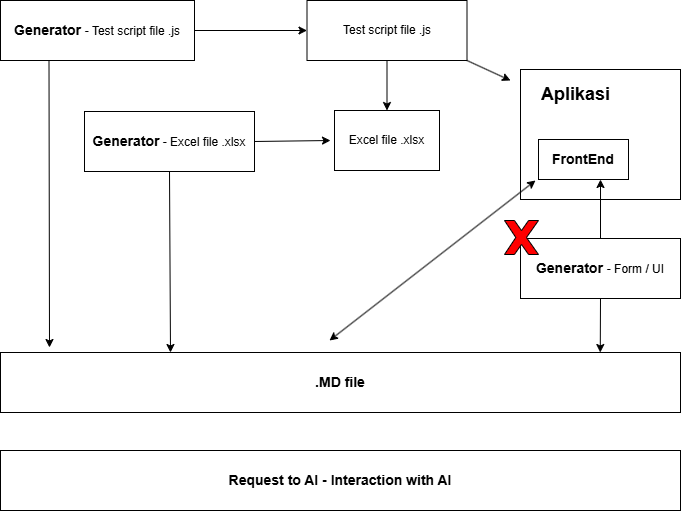
As shown in the image above, I can build a Generator for Type 1, Type 2, Type 2x, and Type 4
- although for Type 4, it is somewhat tricky
- because values need to be “passed”
- from one Form step m to another Form step n
There will be at least several Generators, namely:
generator__Test_script.mjs
generator__Test_script__items.mjs

generator__Symphony__Test_script.mjs

generator__md_to_excel.mjs
generator__md_to_excel__items.mjs
For Type 3 and Type 4x, I have to write the Testing Script manually.
My approach:
- never start from scratch
- first, scaffold a “simpler version”
- so it can be auto-generated using the Generator
- then customize it to accommodate the more complex UI/UX