Data Model part 1 - Entity, DTO {Data Transfer Object}

Data Model part 1 - Entity, DTO {Data Transfer Object}
Situation:
I have a fairly complex system
- a large number of Tables {more than 500 tables}
- a large number of Columns {1 Table can have more than 50 columns}
- Security {data sensitivity}
| Object | Columns |
|---|---|
| Sales Order | |
| Header | more than 80 |
| Items | more than 50 |
| Shipment Request | |
| Header | more than 50 |
| Items | more than 50 |
| Delivery Order | |
| Header | more than 80 |
| Items | more than 50 |
| Purchase Order | |
| Header | more than 50 |
| Items | more than 50 |
Objective:
I need a Guideline for the Data Model, that is:
- aligned with the Business Process
- specific to my own Business Process
- may differ from / be unconventional for other Systems {no problem}
- simple
- relatively easy to implement
- consistent
- consistent across each Object
- consistent in terms of
naming convention
What-if: I don’t have that Guideline?
- A fairly complex system like the one above → difficult to Develop
- also difficult to Maintain
- changes and/or additions to columns/fields can cause related parts to be forgotten and left out of sync
Note:
even with aGuidelinein place, there is still a Challenge around the topic ofout of sync
DTO: Data Transfer Object — a quick concept overview
- in a complex system, not all data from the Database needs to be sent to the FrontEnd
Entity→ a direct representation of aTablein the DatabaseDTO→ the “shape” of data sent between Layers {BackEnd to FrontEnd, or between Services}
Entity≠DTO
Entity is for the Database. DTO is for communication between Layers.
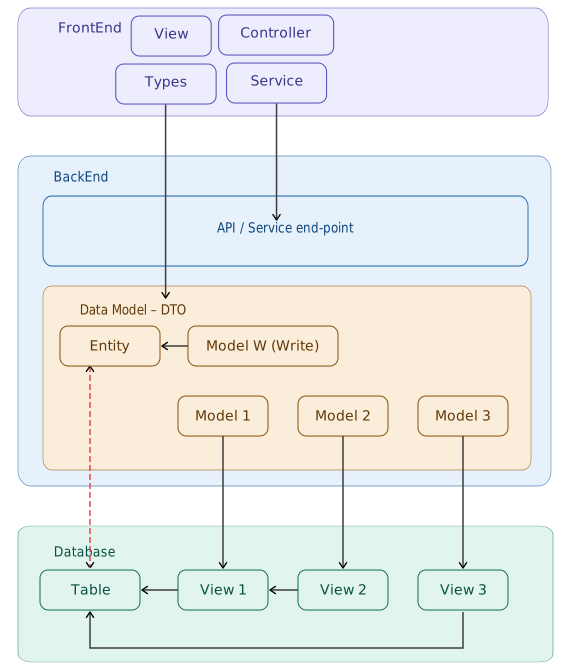
Database Object
- Table
- actual data
- View
- View directly to a Table
- View to another View
DTO: Data Transfer Object
discussed in more detail in the article Data Model part 2 - DTO {Data Transfer Object} link
Challenge around the topic of out of sync
discussed in the articles:
- Data Model part 3 - out of sync Database Object {Table, View} vs Model {BackEnd} link
- Data Model part 4 - out of sync Model {BackEnd} vs Types {FrontEnd} link
This Guideline is not about perfectionism —
it is about consistency.
- consistent in naming
- consistent in structure
so that a complex system remains navigable.
Implementation Example:
- Table: Sales Order
- Header with more than 80 columns
- Items with more than 50 columns
- Not everything will be used on the FrontEnd {HTML View} with a one to one mapping
- there are mechanisms for:
- column restriction
- Masking